⚛️ React + ⚡ Vite
This guide will help you set up a frontend project using React 18, Vite and MUI v6. It covers creating the project, folder structure, running, building and publishing the app.
Video Tutorial
Build a Real-World Mortgage Calculator! 🏠
Ready to move beyond the basics? This tutorial takes you step-by-step through building a practical, interactive Mortgage Calculator Dart. By the end of it, you'll master:
- 🏗️ Creating a real component from the hyperDart template
- 🎨 Designing an interactive, dynamic user interface
- ⚙️ Handling complex user inputs and state management
- 🧮 Performing and displaying live mortgage calculations
- 🧩 Structuring your components for real-world scenarios
This guide will help you set up a frontend project using React 18, Vite and MUI v6. It covers creating the project, folder structure, running, building and publishing the app.
📦 Create a New Template
Run the following command to generate a new project template:
npm create hyper-dart@latest <componentName>

During setup, choose Framework: React, and then select the variant React (JavaScript + Vite).
📂 Folder Structure
This will generate the following folder structure:
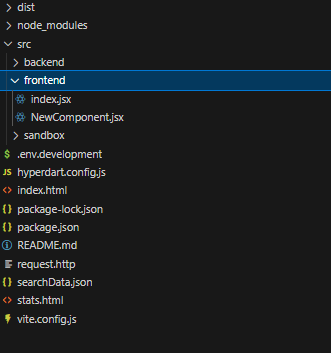
my-sandbox-app/
│
├── src/                      # Main source directory
│   │
│   ├── frontend/             # Frontend (React + Vite) source code
│   │   ├── index.jsx         # React app entry point
│   │   ├── NewComponent.jsx  # Your frontend app code starts here
│   │
│   ├── sandbox/              # Sandbox or testing directory (for experiments)
│       ├── main.jsx          # entry point that renders your root component within an Iframe for local development
├── hyperdart.config.js       # HyperDart-specific configuration file
├── index.html                # Main HTML template (used by Vite)
├── package.json              # Root project package definition
├── README.md                 # Project documentation
├── resource.json             # Resource configuration or metadata
├── searchData.json           # Local search dataset or cache
├── vite.config.js            # Vite configuration file
🧩 Explanation of Key Sections
🔹 src/frontend/
Houses the React app code. index.jsx serves as the app’s entry point, while NewComponent.jsx is an example component.
🔹 sandbox/
A safe experimental area to test new components or configurations without affecting production code.
⚙️ Quick Start
-
Install dependencies:
npm install -
Run frontend:
npm start
Your React + Vite frontend is now live and ready for local development or HyperDart integration.
💻 Frontend (React + Vite)
index.html
<!doctype html>
<html lang="en">

<head>
    <meta charset="UTF-8" />
    <link rel="icon" type="image/svg+xml" href="/vite.svg" />
    <meta name="viewport" content="width=device-width, initial-scale=1.0" />
    <title>hD</title>
</head>

<body>
    <div id="root"></div>
    <script type="module" src="/src/sandbox/main.jsx"></script>
</body>

</html>
Package.json
{
  "name": "@hyperdart/sample-app",
  "version": "1.0.0",
  "source": "src/frontend/index.jsx",
  "main": "dist/index.umd.js",
  "module": "dist/index.modern.js",
  "private": false,
  "type": "module",
  "devDependencies": {
    "@emotion/react": "^11.7.1",
    "@emotion/styled": "^11.6.0",
    "@hyperdart/backend": "^2.0.2",
    "@hyperdart/sandbox": "^2.0.0",
    "@mui/icons-material": "^6.0.0",
    "@mui/lab": "^6.0.0-beta.12",
    "@mui/material": "^6.0.0",
    "@vitejs/plugin-react": "^4.3.4",
    "react": "18.3.1",
    "react-dom": "18.3.1",
    "vite": "^6.0.11",
    "rollup-plugin-visualizer": "^5.12.0",
    "vite-plugin-css-injected-by-js": "^3.5.2"
  },
  "dependencies": {
    "@hyperdart/frontend": "^2.0.0"
  },
  "peerDependencies": {
    "@emotion/react": "^11.7.1",
    "@emotion/styled": "^11.6.0",
    "@mui/icons-material": "^6.0.0",
    "@mui/lab": "^6.0.0-beta.12",
    "@mui/material": "^6.0.0",
    "react": "18.3.1",
    "react-dom": "18.3.1",
    "react-router-dom": "^6.14.0"
  },
  "scripts": {
    "start": "vite",
    "build": "vite build"
  },
  "files": ["hyperdart.config.js", "dist", "resource.json"],
  "publishConfig": {
    "registry": "https://dev-registry.hyperdart.com"
  }
}
src/frontend/index.jsx
The frontend React app code goes into NewComponent.jsx, which is wrapped inside the withHD Higher-Order Component (HOC).
This HOC must not be removed, as it is essential for enabling all functionalities of the HyperDart Sandbox app, both in local development and in production environments.
The withHD wrapper provides:
- Context integration (themes, routing, and shared state)
- Communication with the HyperDart framework
- Proper handling of sandbox behaviors and embedded app logic
import NewComponent from "./NewComponent";
import { withHD } from "@hyperdart/frontend";

export default withHD(NewComponent);
src/frontend/NewComponent.jsx
import React from "react";
import { Typography } from "@mui/material";

function NewComponent(props) {
  return (
    <div>
      <Typography variant="caption">hyperDart New Component</Typography>
    </div>
  );
}

export default NewComponent;
resource.json
This schema provides a fully generic structure for querying any type of resource, such as cars, electronics, real estate, jobs, or products. It is designed as a placeholder that can be customized for your domain.
See resource details
vit.config.json
Your viteConfig.js on setup looks like this:
import { defineConfig } from 'vite';
import react from '@vitejs/plugin-react';
import { visualizer } from 'rollup-plugin-visualizer';
import pkg from './package.json';
import cssInjectedByJsPlugin from 'vite-plugin-css-injected-by-js';
import hdConfig from './hyperdart.config';
import hDBackend from '@hyperdart/backend';

function createDartFramePlugin(hdConfig, pkg) {
  const baseURL = hdConfig?.client?.baseURL || "/";
  const updatedConfig = {
    ...hdConfig,
    client: {
      ...hdConfig.client,
      location: '/' + pkg.source,
    },
  };

  return {
    name: 'vite-plugin-dart-frame',
    configureServer(server) {
      server.middlewares.use(baseURL, async (req, res, next) => {
        try {
          const rawHtml = await hDBackend.createDartFrame(updatedConfig, null);
          const html = await server.transformIndexHtml(req.originalUrl, rawHtml);
          res.statusCode = 200;
          res.setHeader("Content-Type", "text/html");
          res.end(html);
        } catch (e) {
          server.ssrFixStacktrace(e);
          next(e);
        }
      });


    },
  };
}

export default defineConfig(({ command }) => {
  const isProduction = command === 'build';

  return {
    // base: hdConfig.client.baseURL,
    plugins: [
      react({
        jsxRuntime: 'automatic',
      }),
      createDartFramePlugin(hdConfig, pkg),
      cssInjectedByJsPlugin(),
      visualizer(),
    ],
    define: {
      'process.env.NODE_ENV': JSON.stringify(isProduction ? 'production' : 'development'),
    },
    server: {
      cors: true,
      headers: {
        "Access-Control-Allow-Origin": "*",
      },
      proxy: {
        '/nodeapi': {
          target: 'https://dev.hyperdart.com',
          changeOrigin: true,
          secure: true,
        },
        '/c': {
          target: 'https://dev.hyperdart.com',
          changeOrigin: true,
          secure: true,
        },
      },
    },
    build: {
      lib: {
        entry: pkg.source,
        name: pkg.umdName || 'HD' + pkg.name,
        fileName: 'index.modern',
        formats: ['es'],
      },
    },
  };
});
hyperdartConfig.js
Please find the details on configuration file here:
See details
🎨 Sandbox
Tests new components in local without affecting production code.
main.js
Entry point that renders your root component within an Iframe for local development
import './index.css';
import React from 'react';
import { createRoot } from 'react-dom/client';
import { HDSandbox } from '@hyperdart/sandbox';
import hDConfig from '../../hyperdart.config';
import defaultSearchData from '../../searchData.json';
import resourceJson from '../../resource.json'

const container = document.getElementById('root');
const root = createRoot(container);
root.render(<HDSandbox config={hDConfig} searchData={defaultSearchData} resource={resourceJson}/>);
📦 Tools & Frameworks
- Vite
- React
- MUI
- Node.js
🚀 Publishing the Fronted App
- Build frontend:
npm run build - Update version:
npm version patch - Publish:
npm publish
✅ Publish Validation
Publishing is authenticated — make sure your registry token is set (see Publish) before running npm publish.
When you publish, the registry validates your hyperdart.config.js and rejects the package if any check fails:
| Check | Requirement |
|---|---|
client.location | File must exist in the published package (e.g. dist/index.modern.js) |
server.location | If a server block is present, the file must exist in the published package |
server.configPath | If a server block is present, the file must exist in the published package |
triggers.keywords | Must not be empty and must not contain empty strings |
query_format.regex | Must not be empty and must not contain empty strings |
demoVideo | Must be a valid YouTube link |
github | Must be a valid GitHub link |
// hyperdart.config.js
export default {
  // ...
  demoVideo: 'https://www.youtube.com/watch?v=<video-id>',
  github: 'https://github.com/<user>/<repo>',
}